 |
|
|
| |
 |
|
[Math+Magic]™ Pro Edition for Adobe InDesign for Windows
|
|
MathMagic Pro Edition v8.9 for Adobe InDesign
with MathMagic Plug-ins for InDesign
New CC 2023 (64-bit versions)
CC 2022 (64-bit versions)
CC 2021 (64-bit versions)
CC 2020 (64-bit versions)
CC 2019 (32-bit & 64-bit versions)
CC 2018 (32-bit & 64-bit versions)
CC 2017 (32-bit & 64-bit versions)
CC 2015 (32-bit & 64-bit versions)
CC 2014 (32-bit & 64-bit versions)
CC (32-bit & 64-bit versions)
CS3, CS4, CS5, CS5.5, CS6
Date of Release: Nov-18-2022
|
|
Thank you for choosing MathMagic, the ultimate equation editor on the planet!
MathMagic Pro Edition for Adobe InDesign is an equation editor mainly for use with Adobe InDesign software in editing any mathematical expressions and symbols with WYSIWYG interface and various
powerful features.
|
|
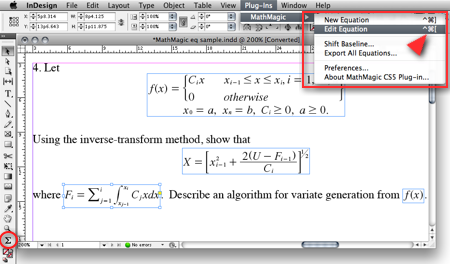
|
(InDesign window and menubar with MathMagic Plug-in menu)
|
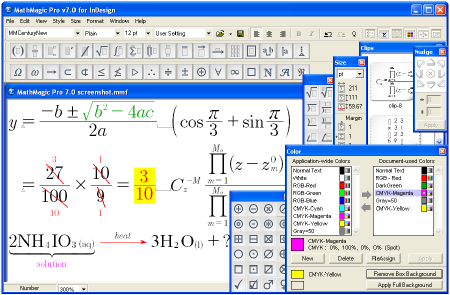
|
(MathMagic Main Editor window)
|
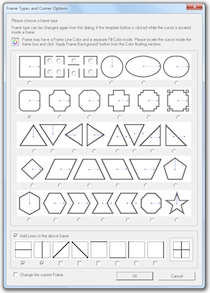
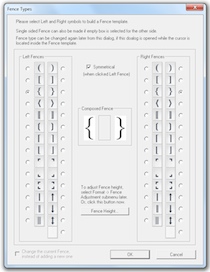
(Frame and Border Types) (Vertical Fence Types)
|
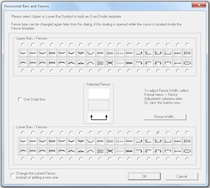
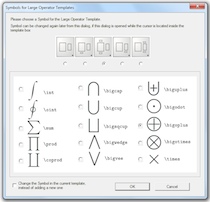
(Horizontal Fences, Decor Shapes) (Large Operator Symbols)
|
| * What's New (v8.9 - November 18, 2022) |
- Added: Supports Adobe InDesign CC 2023.
- Added: Some more fonts added for SVG embedding.
- Fixed: SVG drawing improved for a few templates.
- Fixed: Communication issue with InDesign CC 2023.
InDesign Plug-ins :
- Added: MathMagic CC2023 plug-in added for Adobe InDesign CC 2023.
|
For the full history of changes, please read the Version History file.
|
|
|
* How to Install
|
- Please read below (How MathMagic Pro works - 1. Installing) for more details.
- If installing on Windows XP,
- Download the latest Installer from download page
- Double click on the installer icon to proceed the installation
- Install MathMagic Plug-in manually, Set the path in the Preferences dialog. (read below)
- Launch MathMagic application from Windows Start menu or from the following location:
\Program Files (x86)\MathMagic Pro Edition\
|
- If installing on Windows Vista or newer,
- Download the latest Installer from download page
- Double click on the installer icon to proceed the installation.
- Install MathMagic Plug-in manually, Set the path in the Preferences dialog. (read below)
- After installation, select MathMagic application from the following location:
\Program Files (x86)\MathMagic Pro Edition\
- Right-click on it, select 'Properties'.
- Select "Windows XP SP3" compatibility mode, and turn on "Run as an Administrator" privilege.
(This is to make MathMagic read/write Registry correctly. Otherwise, Registry error message might be displayed.)
- Then, launch MathMagic application.
|
- How to install MathMagic Plug-in
- If running on Windows 7, 8 or Windows Vista, please set the Properties of your InDesign application first. This is to make InDesign appplication can talk to the external MathMagic Pro application and also let MathMagic Plug-in save the Preferences file correctly.
- right-click on InDesgin CCx.exe application, select 'Properties', from
\Program Files\Adobe\InDesign CCx.exe
- Select "Windows XP SP3" compatibility mode, and turn on "Run as an Administrator" privilege.
- The correct version of MathMagic plug-in should be manually installed by copying from
\Program Files (x86)\MathMagic Pro Edition\Plug-ins\ folder
to \Adobe\InDesign CCx\Plug-ins\ folder.
* The whole plug-in folder of "MathMagic CC20xx" should be copied, instead of copying files from inside the "MathMagic CC20xx" folder.
(If for InDesign CC2019 or older with 64-bit InDesign,
"MathMagic CCxxxx-64bit" plug-in folder should be installed, instead of 32-bit of "MathMagic CCxxxx" folder. If InDesign CC2020 or newer, only 64-bit plug-ins available.)
- Then, set the path to MathMagic Pro v8.8 InD.exe application, from the
InDesign menubar -> Plug-ins -> MathMagic -> Preferences... dialog: Click "Find" button.
|
|
|
|
|
1. Installing
- Install MathMagic Pro for InDesign for Windows using the latest MathMagic Pro installer.
- Manually install MathMagic plug-in in the following location.
- copy "MathMagic CC" or "MathMagic CSx" folder itself from
\Program Files (x86)\MathMagic Pro Edition\Plug-ins\ folder
- and paste(or simply drag&drop) it into your
\Adobe InDesign CC folder\Plug-ins\ folder
or \Adobe InDesign CSx folder\Plug-ins\ folder
- Then, launch your InDesign application. Once the MahgMagic plugin is installed and loaded correctly, you should see.
InDesign menubar -> Plug-ins -> MathMagic sub menu.
- Then, please choose : InDesign menubar -> Plug-ins -> MathMagic -> Preferences dialog: click "Find" button to select the path to the external MathMagic Pro application, which is typically
\Program Files (x86)\MathMagic Pro Edition\MathMagic Pro 8.x InD.exe
- Then, all your initial setting should be done if you are running Windows XP.
- If running on Vista or Windows 7, please read above (* How to Install) to set the Admin setting in the Properties window of both MathMagic Pro application and InDesign appliation.
- Please read the License email or ReadMe First file for more information, located in
\Program Files (x86)\MathMagic Pro Edition\ folder
2. Creating Equations
- Launch Adobe InDesign application(CSx or CCx).
- Make a new InDesign document
or open a document.
- Select the Plug-ins menu
-> MathMagic sub-menu.
- Choose "New Equation" item
to create an equation.
If the cursor is located in the text box,
the equation will be inserted in the cursor
position as an In-Line Graphic(ILG). Otherwise,
the equation will be placed as an EPS
graphic on where you click the mouse.
- You may select the Sigma
tool button from the floating main toolbar
to create an equation box, and then drag
a rectangle in the document to specify
the location of an equation once created
by the external MathMagic Pro.
- You may also right button click while the cursor is in the text box, so that you can choose the "New Equation" from the contextual menu.
- If you either select "New Equation" menu or drag a rectangle with th Sigma tool, MathMagic Pro application will be launched, if not running already, and an empty equation editor window will be opened. In case MathMagic Pro application is not launched automatically within a few seconds, please launch the application manually from the following location.
\Program Files (x86)\MathMagic Pro Edition\MathMagic Pro 8.x InD.exe
- Enter any equation in the
MathMagic editor window, and then Close(ctrl-W)
or Save(ctrl-S) the window. This will send
the equation to the InDesign document
back.
3. Editing Equations
- Choose "Edit Equation..."
item to edit the currently selected equation.
Or, just double-click on the equation
box to open it with the external MathMagic
Pro application for editing. You may also
control-click on the equation to bring
up the contextual menu, after changing
the cursor to the Arrow tool.
- After creating or editing
of equation with the external MathMagic
Pro, just press control-S and then the equation is placed in the
InDesign document.
- The baseline of all equations
will be automatically adjusted. But if
you want to lower or raise the baseline,
you may do so.
- just change the cursor
to the arrow cursor and move the equation
box by dragging to where you desire,
or
- control-click on the
equation box to bring up the contextual
menu, and then select "Shift Baseline"
item, or
- select an equation
box and choose "Shift Baseline" menu
from the MathMagic plug-in menu
4. Changing the Baseline and Bounding margins
- The baseline of all equations
will be automatically adjusted. But if
you want to lower or raise the baseline,
you may do so.
- just change the cursor
to the arrow cursor and move the equation
box by dragging to where you desire,
or
- control-click on the
equation box to bring up the contextual
menu, and then select "Shift Baseline"
item, or
- select an equation
box and choose "Shift Baseline" menu
from the MathMagic plug-in menu
- You may also customize the bounding margin gaps(left, right, top, bottom) of the equation, by specifying other value from the last item of Define Spacing window.
5. Assigning Shortcut keys to MathMagic menu items
- Install MathMagic plug-in by the instruction
- Launch InDesign application and make sure that MathMagic plug-in is loaded under Plug-Ins menu.
- Select Edit -> Keyboard Shortcuts... menu item from InDesign's menubar.
- In the "Keyboard Shortcuts" dialog, click "Product Area" popup menu, and select "MathMagic" item.
- Assign your preferred shortcut key, such as "ctrl-shift-]" for "New Equation", "ctrl-shift-[" for "Edit Equation".
|
|
| * System Requirements |
- Pentium or Faster
- Windows XP SP2 or newer including Vista, 7, 8, 10
- Adobe InDesign™ CS3 ~ CS6, CC, CC 2014, CC 2015, CC 2017, CC 2018, CC 2019, CC 2020, CC 2021, CC 2022, CC 2023
- About 60MB of hard disk space for a complete installation
- Microsoft Visual C++ 2005 SP1 Redistributable Package
|
|
|
|
* What is MathMagic, or [Math+Magic]™
|
Su+quyen+ru+cua+nguoi+vo+vtv3 -
Dù ngập tràn những mưu mô và hận thù, bộ phim vẫn gửi gắm thông điệp sâu sắc về trong xã hội hiện đại. Eun Jae chỉ thực sự tìm thấy hạnh phúc và giá trị bản thân khi cô ngừng chịu đựng, học cách yêu thương chính mình và đứng lên bằng đôi chân của mình. Bộ phim là lời cảnh tỉnh về luật nhân quả trong hôn nhân: những kẻ phản bội và chà đạp lên tình nghĩa phu thê cuối cùng đều phải nhận lấy kết cục cay đắng.
The success of the drama is largely attributed to the stellar performances of its lead actors. Here's a look at the main cast and the contrasting lives they led on and off the screen:
(tên tiếng Hàn: 아내의 유혹 / Temptation of Wife ) phát sóng trên kênh VTV3 năm 2011 là một trong những siêu phẩm truyền hình Hàn Quốc thuộc thể loại "makjang" (phim tâm lý xã hội có nhiều tình tiết kịch tính, cường điệu) tạo nên cơn sốt mạnh mẽ nhất tại Việt Nam. Được nhào nặn bởi "biên kịch vàng" Kim Sun-ok và do đài SBS sản xuất vào cuối năm 2008, bộ phim dài 86 tập (bản cắt VTV3) đã thiết lập những kỷ lục rating vô tiền khoáng hậu lên tới 40% tại quê nhà trước khi thống trị khung giờ muộn 22h10 của VTV3. Hơn một thập kỷ trôi qua, tác phẩm vẫn là biểu tượng kinh điển khi nhắc đến chủ đề ngoại tình, phản bội và sự tái sinh mạnh mẽ của người phụ nữ trong hôn nhân.
Cốt truyện kịch tính và màn "lột xác" kinh điển
Jang Seo Hee (vai Goo Eun Jae), Byun Woo Min (vai Jung Gyo Bin), Kim Seo Hyung (vai Shin Ae Ri), Lee Jae Hwang (vai Min Gun Woo) su+quyen+ru+cua+nguoi+vo+vtv3
Eun Jae được cứu sống, nhưng mất đi đứa con. Với sự giúp đỡ của gia đình mới, cô trở lại dưới danh nghĩa Min So Hee - một người con gái hoàn toàn khác, quyến rũ và đầy thủ đoạn, bắt đầu kế hoạch quyến rũ lại chồng cũ để trả thù. 3. Các Nhân Vật Chính và Diễn Xuất Đỉnh Cao Goo Eun Jae (Jang Seo Hee)
Tiết tấu dồn dập, diễn xuất bùng nổ, nặng tính tâm lý.
(tên tiếng Hàn: 아내의 유혹 - Temptation of Wife ) là bộ phim truyền hình Hàn Quốc kinh điển thuộc thể loại tâm lý - báo thù, từng tạo nên cơn sốt rating lên đến 40% tại xứ sở Kim Chi trước khi chính thức cập bến và làm bùng nổ khung giờ muộn trên kênh VTV3 .
1. Nội dung kịch bản: Từ nước mắt đến sự tái sinh Dù ngập tràn những mưu mô và hận
Nội dung phim xoay quanh cuộc đời đầy bi kịch nhưng cũng cực kỳ kiên cường của Goo Eun Jae (do nữ diễn viên Jang Seo Hee thủ vai).
Cụm từ khóa "su+quyen+ru+cua+nguoi+vo+vtv3" sẽ còn được tìm kiếm rất nhiều trong thời gian tới, không chỉ bởi dư âm của bộ phim, mà bởi thông điệp của nó vẫn luôn vẹn nguyên giá trị:
Through music, drama, and comedy, women on VTV3 bring joy and engagement to a broad audience. Their performances not only entertain but also showcase the diversity of talent and creativity within Vietnam.
Bạn dự định đăng bài này trên hay fanpage phim ? The success of the drama is largely attributed
After more than a decade, Sự Quyến Rũ Của Người Vợ remains a cultural touchstone. It is frequently cited as the quintessential predecessor to later revenge drama hits such as The World of the Married and Marry My Husband , demonstrating that its core formula of betrayal and rebirth remains timeless. The film not only launched its actors to stardom but also set a high bar for its genre, securing its place in the memories of Vietnamese audiences as an unforgettable television classic.
Eun Jae là một người vợ hiền lành, hiếu thảo và luôn nhẫn nhịn chăm sóc gia đình nhà chồng. Tuy nhiên, lòng tốt của cô chỉ đổi lại sự phản bội tàn nhẫn từ người chồng tệ bạc Jung Gyo Bin (Byun Woo Min) và người bạn thân từ thuở nhỏ Shin Ae Ri ([Kim Seo Hyung]).
Không dừng lại ở đó, chính Eun Jae cũng bị chính chồng và tình nhân hãm hại, đẩy xuống biển khi cô đang mang thai, nhằm đoạt tài sản. Nhưng với ý chí và cơn thịnh nộ của một người vợ bị phản bội, cô may mắn được cứu sống, lột xác hoàn toàn cả về ngoại hình lẫn tính cách, trở về với một thân phận mới, quyết tâm trả thù bằng mọi giá.
3. Phản ánh trần trụi góc khuất hôn nhân và lòng tham
Nếu bạn muốn tìm hiểu thêm về bộ phim này, hãy cho tôi biết bạn quan tâm đến , những bộ phim có đề tài trả thù tương tự , hay muốn tóm tắt chi tiết một phân đoạn cụ thể nào nhé! Share public link |
|
|
|
| * Price |
|
|
- MathMagic Pro Edition: US$499.00
- With 2-year Free upgrade and Free tech support: $695.00
- 2-Month Subscription License: $100.00
- MathMagic Pro Edition Academic: US$299.00
- With 2-year Free upgrade and Free tech support: $399.00
|
For the full price information, please
visit our online store
or download the Price Table. |
|
Click
here to go to download page.
|
|
|
|
* History of Older Versions
|
|
|
|
|
[Math+Magic], MathMagic, MathMagic Personal Edition, MathMagic Pro Edition, MathMagic Prime Edition, MathMagic Pop Edition, MathMagic logo, InfoLogic and InfoLogic logo are trademarks or registered trademarks of InfoLogic, Inc.
MS Word, PowerPoint, Windows are trademarks or registered trademarks of Microsoft corp.
Adobe InDesign, Illustrator, Photoshop, Acrobat are trademarks or registered trademarks of Adobe Systems Inc.
Other trademarks may be the properties of their respective owners.
|
|
|
 |
Copyright 1998-2023. InfoLogic, Inc. All rights reserved.
[ We proudly develop Quality Products]SM
|
|
|
| |
|
|
|










